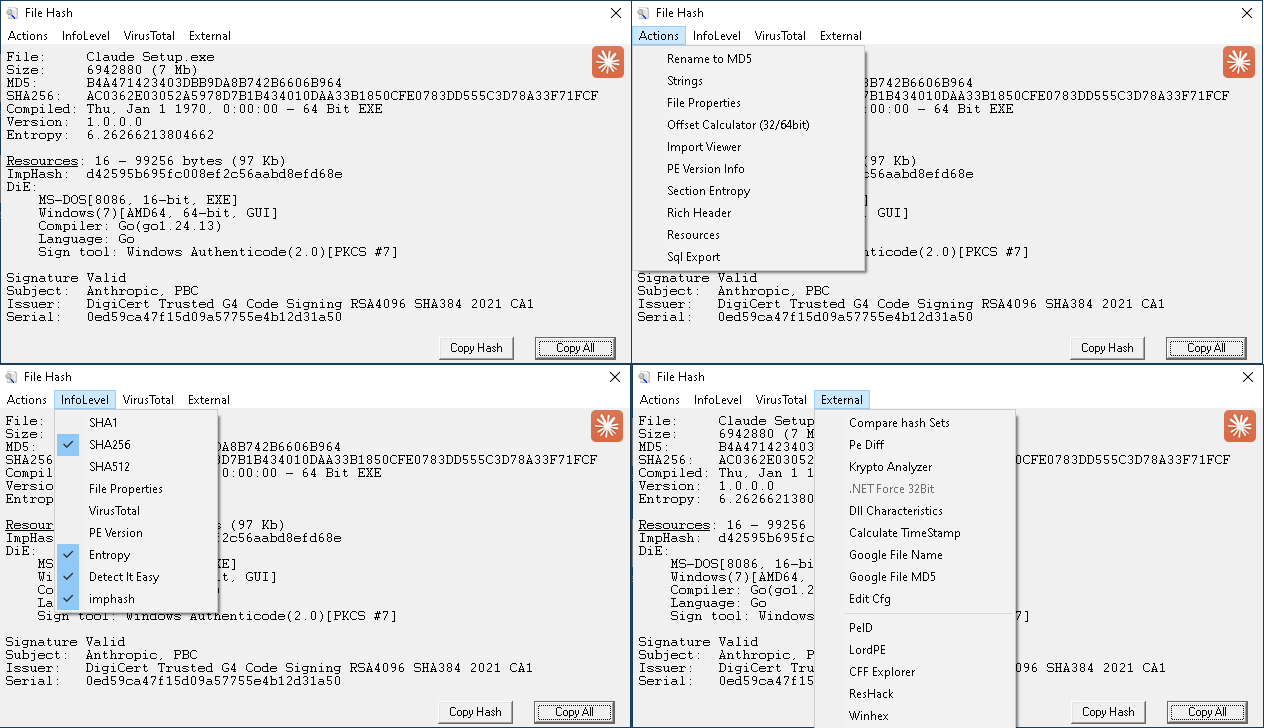
File Hash (frmFileHash) is the per-file analysis dialog opened by the Md5 Hash right-click menu. It is the densest single feature in shellext, built on the sppe3 PE editor. The text pane shows a layered report — hashes, signature, PE metadata, optional VT lookup — and a popup menu hangs off the report to drive deeper inspectors and external tools.
The dispatch is shellext.exe "%1" /md5f, which calls frmFileHash.ShowFileStats. The report is rebuilt each time an InfoLevel option is toggled, so the visible fields are exactly the ones currently checked.
The fields below show up in order in the text pane. Most of the optional ones are toggled from the InfoLevel menu (right-click, see next section).
| Field | Source |
|---|---|
| File: | File name. Suppressed when the file is already named with its MD5 (no point repeating it). |
| Size: | Bytes, with a human-readable suffix (KB/MB) once over 1 KB. |
| MD5: | Always shown. |
| SHA1: / SHA256: / SHA512: | Optional. Toggled in InfoLevel. |
| Compiled: / FileType: | PE compile date (GMT, with bitness and DLL/EXE), or a content-type description for non-PE files. Source: GetCompileDateOrType. |
| PDB: | Path from the debug directory, when present. |
| Version: | Version-info string from the file's resource table, when present. |
| Entropy: | Whole-file Shannon entropy. Optional. |
| Exports: | Count of exported functions. Click the underlined "Exports:" label to dump the export names as a LIBRARY/EXPORTS block ready for use with lib.exe /def:. |
| Resources: | Count and total byte size, when the file has resources beyond icons and version info. Click the label to launch the embedded resource viewer (or ResHacker if it's wired in via External; see below). |
| ImpHash: | Mandiant-style import hash (lowercase). Optional. |
| PE Version Info report: | Full version-info dump. Optional. |
| DiE: | Detect It Easy scan output. Optional. Requires diescan dependencies (won't work on XP SP0 — needs msvcr100.dll). |
| Signature / Subject / Issuer / Serial: | Authenticode verification result, then the cert subject/issuer/serial pulled via CFileSig. Always shown when the file is signed. |
| VT scan block | VirusTotal report (scan date, detection ratio, summary). Optional. Click "Scan_Date:" to open the VT permalink in the browser; click "Detections:" to open the detailed report inline. |
| FileProps: | Verbose Win32 file-version-info dump (CompanyName, OriginalFilename, ProductVersion, etc). Optional. |
Right-click the report pane (or use the InfoLevel top-level menu) to toggle the optional fields. Each toggle is persisted per-user and the report regenerates immediately.
| Item | Toggles |
|---|---|
| MD5 | Always on (hidden in the menu — MD5 is the primary identifier). |
| SHA1, SHA256, SHA512 | Adds the corresponding hash to the report. |
| File Properties | Adds the verbose Win32 file-version-info dump. |
| VirusTotal | Adds the VT scan summary block. Disabled if no API key is set. |
| PE Version | Adds the structured PE version report. |
| Entropy | Adds whole-file entropy. |
| Detect It Easy | Adds DiE output. |
| imphash | Adds the import hash. |
The popup's main column drives the inline inspectors. Most of these are PE-only and are disabled when the file isn't a PE.
| Item | What it does |
|---|---|
| Rename to MD5 | Renames the file to its MD5 hash. Disabled if the file is already named with its MD5. |
| Strings | Calls shellext.exe "%1" /peek — same Strings dialog you'd get from the right-click menu on the file. |
| File Properties | Writes the full Win32 file-info dump to a temp file and opens it in Notepad. |
| Offset Calculator (32/64 bit) | Opens the Offset Calculator for the loaded PE. Section list, VA ↔ RVA ↔ FileOffset translation, and DumpFix. |
| Import Viewer | Opens the Imports Viewer showing imported DLLs on the left, their functions on the right. |
| PE Version Info | Opens the structured PE version report in frmPEVersion. |
| Section Entropy | Per-section table: name, entropy, CRC32, raw size, and percentage of total raw bytes. Output goes to frmPEVersion. |
| Rich Header | Loads the file's Rich header (the linker compiler metadata block) and dumps it via CRichHeader.dump. |
| Resources | Opens the embedded resource viewer (frmResViewer). |
| Sql Export | Opens the SQL Export dialog with this file as the (single-file) source. |
| Item | What it does |
|---|---|
| View Results | Open the VT scan report inline in frmPEVersion (full per-AV list). Falls back to launching the VT helper if the report hasn't been fetched yet. |
| Goto Scan Page | Open the VT permalink in the default browser. |
| Submit To VirusTotal | Upload the file to VT (virustotal.exe /submit). |
| Set API Key | Open the API Key dialog. |
| Cache Results | Toggle. When on, VT reports are cached to %TEMP%\vt_cache — cuts the 4-second-between-requests delay to zero on repeat lookups. On by default. |
| Item | What it does |
|---|---|
| Compare hash Sets | Opens the Compare HashSets dialog, preloaded with this file as one of the inputs. |
| Pe Diff | Launches pediff.exe on the file. |
| Krypto Analyzer | Launches the bundled Krypto Analyzer PEiD plugin (kanal.dll) against the file. |
| .NET Force 32Bit | Copies the file to <name>.32bit and runs CorFlags.exe /32Bit+ on the copy. Enabled only for AnyCPU or 64-bit .NET assemblies. Useful when you need to debug a .NET sample under a 32-bit toolchain. |
| Dll Characteristics | Opens the DLL Characteristics editor — toggle ASLR, DEP, and Force Integrity flags in the OptionalHeader and save back. |
| Calculate TimeStamp | Opens frmTimeStamp — Date ↔ Unix-style timestamp converter for working with PE compile dates. |
| Google File Name | Search the file name on Google. |
| Google File MD5 | Search the MD5 on Google. |
| Edit Cfg | Open shellext.external.txt in Notepad — the user-defined external-tools config (see below). |
| (user entries) | One menu item per line in shellext.external.txt. |
On form load, frmFileHash reads shellext.external.txt from the application directory and adds an entry under External for every non-comment line. This is how you wire up your own reverse-engineering toolchain without editing source.
Format is menu_text=command_line, one per line. Lines starting with # are ignored. Two substitution tokens are supported:
| Token | Replaced with |
|---|---|
| %1 | The full path of the loaded file (short-name form, no quotes needed). |
| %app_path% | The shellext install directory, with trailing backslash. |
Example:
HxD = C:\Tools\HxD\HxD.exe %1
IDA Free = C:\Tools\IDA\ida.exe %1
ResHack = %app_path%ResHacker.exe %1
PEStudio = C:\Tools\pestudio\pestudio.exe %1
# comment lines are ignored
The "ResHack" entry is special-cased — if you click the Resources: link in the report and there's no ResHacker.exe in the app directory, the dialog falls back to whatever path you've registered under a "ResHack" external entry. This lets ResHacker be installed elsewhere on the system.
Edit takes effect on next form load (i.e. next time you click Md5 Hash); the file is read once at startup.
%TEMP%\vt_cache; created on form load if it doesn't exist.