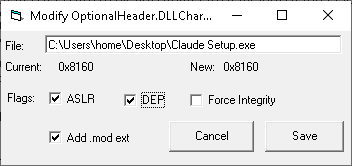
DLL Characteristics (frmDllCharacteristics) is a small editor for the OptionalHeader.DLLCharacteristics field of a PE file — the bitfield that tells the loader whether to apply ASLR, enforce DEP, or check Authenticode integrity. Reachable from File Hash → right-click → External → Dll Characteristics.
It edits the file in place at offset peOffset + 0x5E (the location of the DllCharacteristics WORD inside the OptionalHeader, valid for both PE32 and PE32+).
| Flag | Bit | Meaning |
|---|---|---|
| ASLR | 0x0040 (DYNAMIC_BASE) | Image can be relocated to a random base address at load time. |
| Force Integrity | 0x0080 (FORCE_INTEGRITY) | Loader enforces Authenticode signature validation before mapping the image. |
| DEP | 0x0100 (NX_COMPAT) | Image is compatible with hardware-enforced Data Execution Prevention. |
The Current label shows the existing 16-bit value as 0xNNNN; New shows the value that will be written if you click Save. Other bits in the field are preserved — only the three flags above are touched, via XOR / OR.
Add .mod ext is checked by default. When on, Save copies the file to <original>.mod first and writes the modified value into the copy — the original is left untouched. If a .mod already exists, you're prompted to delete it.
When unchecked, Save writes directly to the original file. The dialog re-loads the modified file after the write, so you can verify the change took.
In a malcode lab you frequently want to disable ASLR or DEP on a target so that hardcoded VAs in disassembly notes line up with what the debugger sees, or so that an old shellcode payload survives long enough to be analyzed. Force Integrity is occasionally useful for testing — see what an OS does with a malformed-but-signed image (or vice versa).
For toggling ASLR system-wide instead of per-file, use the shellext configurator's ASLR checkbox, which edits HKLM\...\Memory Management\MoveImages.
DllCharacteristics.cs.