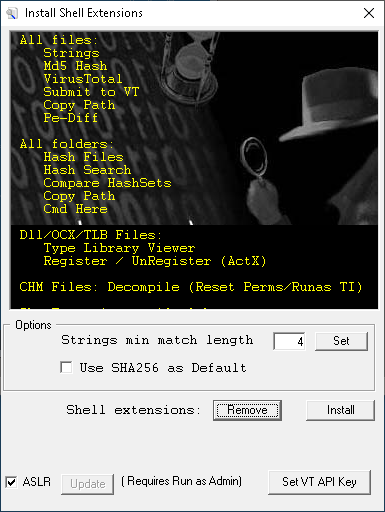
ShellExt is the installer/configurator for the right-click context menus that the Malcode Analyst Pack adds to Windows Explorer. Run with no arguments it shows the configurator window. Run with a path and a mode switch (the form Explorer invokes when a menu item is clicked) it dispatches to the matching analysis dialog.
The configurator writes its menu entries into HKEY_CLASSES_ROOT, so installation requires Administrator. On Vista and later, clicking Install or Remove auto-elevates by re-launching shellext.exe with /install or /remove. The same binary handles every menu item: each entry's command line is shellext.exe "%1" /xxxx where the trailing 5-char switch tells frmMain.Form_Load which feature to dispatch.
| Control | Action |
|---|---|
| Install | Write all context-menu entries to HKEY_CLASSES_ROOT. Auto-elevates on Vista+. Also clears NeverShowExt on lnkfile and piffile (so .lnk and .pif extensions become visible in Explorer) and ensures .tlb is mapped to tlbfile. |
| Remove | Delete every menu key the installer creates. Auto-elevates on Vista+. |
| Strings min match length | Minimum string length used by the Strings menu. Default 4. Stored per-user; click Set to save. |
| Use SHA256 as Default | When checked, the Hash Files dialog uses SHA256 as its primary hash column instead of MD5. Stored per-user. |
| ASLR / Update | Toggles HKLM\...\Memory Management\MoveImages. Checked = ASLR enabled (deletes the override value, restoring the OS default); unchecked = ASLR disabled (sets MoveImages = 0). Reboot required. Button is only enabled when the process is elevated. |
| Set VT API Key | Opens the VirusTotal API key dialog so VT lookups know which key to use. |
The configurator preview lists every menu the installer registers. Each row in the tables below corresponds to one HKCR shell\<name>\command key, the file class it lives under, and the dispatch handled by shellext.exe (or one of the other tools the installer registers on its behalf).
*)| Menu | Switch | What it does |
|---|---|---|
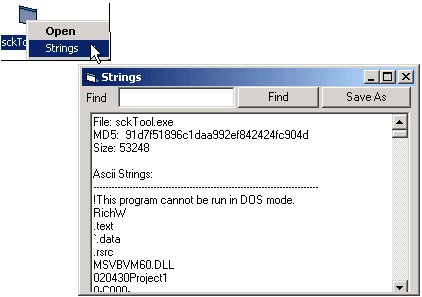
| Strings | /peek | Extracts ASCII and Unicode strings from the file using the MS VBScript RegExp library and shows them in a results window. Minimum length controlled by the configurator's Strings min match length setting. Includes progress bar, search-all, and rescan-with-new-min-length.
 |
| Md5 Hash | /md5f | Opens the File Hash dialog: name, size, MD5, optional SHA1/SHA256/SHA512, PE compile date, version info, imphash, entropy. Right-click menu inside the dialog drives Strings, Imports, Resources, Section Entropy, Rich Header, SQL Export, PE Diff, .NET CorFlags, DLL Characteristics, Krypto Analyzer, and an external-tools submenu. |
| Virus Total | — | Hash lookup on VirusTotal. Launches virustotal.exe "%1" directly. See virustotal helper. |
| Submit to VirusTotal | — | Submit file to VT. Launches virustotal.exe "%1" /submit. |
| Copy Path | /copy | Copies the selected file's path to the clipboard. Quotes are stripped. |
| Pe-Diff | /pdif | Launches pediff.exe "%1". Used to do a structural diff of two PE files. |
| Menu | Switch | What it does |
|---|---|---|
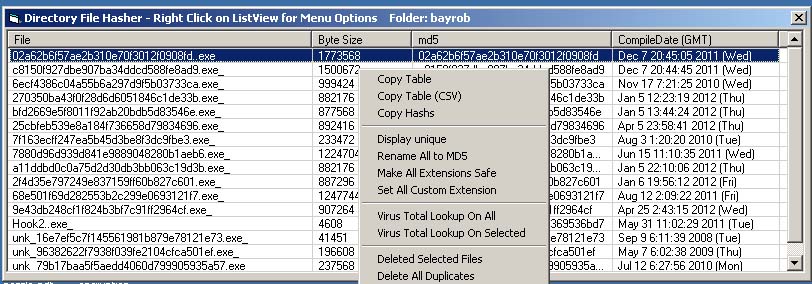
| Hash Files | /hash | Opens the Hash Files dialog: lists every file in the folder with name, size, MD5 (or SHA256), and PE compile date. Heavy right-click menu drives the per-folder workflow — rename to hash, dedupe, move/flatten, recursive hash, VT lookup, SQL export, Rich Header report, imports/exports report, DiE report, strings dump, and external tools.
 |
| Hash Search | /hsch | Search the folder (recursively) for files matching one or more MD5 hashes. Hashes are pasted in or loaded from a file. |
| Compare HashSets | /hset | Opens the Compare HashSets dialog. Drop two folders or two hash lists; reports Base Only, Compare Only, and Shared. Useful for differential analysis — clean-vs-infected snapshot diffs, sample-set deduplication, etc. |
| Copy Path | /copy | Copies the folder's path to the clipboard. |
| Cmd Here | /cmdh | Opens cmd.exe in the selected folder. |
| Menu | Switch | What it does |
|---|---|---|
| Type Library Viewer | — | Launches tlbViewer.exe "%1" for inspection of the file's type library. Registered for dllfile, ocxfile, and tlbfile. |
| Register | /regi | regsvr32 "%1", routed through shellext so the call hits the architecture-correct registrar instead of defaulting to the 64-bit regsvr32 on 64-bit systems. Registered for dllfile and ocxfile. Auto-elevates. |
| UnRegister | /ureg | regsvr32 /u "%1" via the same routing. Registered for dllfile and ocxfile. Auto-elevates. |
| Register (TLB) | /treg | Registers a type library via LoadTypeLib + RegisterTypeLib (regsvr32 doesn't handle .tlb directly). Registered for tlbfile. Auto-elevates. |
| Menu | Switch | What it does |
|---|---|---|
| Decompile | /deco | Runs hh.exe -decompile against the .chm and opens the resulting chm_src folder in Explorer. If the source path contains spaces, the file is first copied to %TEMP% with spaces stripped from the name (hh.exe chokes on spaces in either the source or destination path). On Windows 11, the chm.file\shell\Decompile key may need TrustedInstaller permissions to write — the installer handles this on elevated install. |
shellext.exe is invoked once for each menu click. frmMain.Form_Load reads the trailing 5 characters of the command line and dispatches:
| Switch | Dispatch |
|---|---|
| /peek | frmStrings.ParseFile |
| /md5f | frmFileHash.ShowFileStats |
| /hash | frmHash.HashDir |
| /hsch | frmMD5FileSearch.Launch |
| /hset | frmCompareHashSets.Show |
| /hexv | frmHexView.HexView (used internally by other dialogs; not a registered menu) |
| /copy | Set clipboard, exit |
| /cmdh | cmd.exe /k cd "<path>" |
| /regi | Elevate, run regsvr32 "<file>" |
| /ureg | Elevate, run regsvr32 /u "<file>" |
| /treg | Elevate, register .tlb via LoadTypeLib / RegisterTypeLib |
| /deco | Run hh.exe -decompile, open output in Explorer |
| /pdif | Shell pediff.exe "<file>" |
| /install | Write all HKCR entries (re-entrant, used by the elevated relaunch) |
| /remove | Delete all HKCR entries (re-entrant, used by the elevated relaunch) |
In addition to the per-menu HKCR entries, Install performs three small fix-ups that have proven useful in a malcode lab:
HKCR\lnkfile\NeverShowExt — .lnk extensions become visible in Explorer (instead of being hidden as "link to ...").HKCR\piffile\NeverShowExt — same for .pif.HKCR\.tlb maps to tlbfile so the type-library menu items can hang off it.These changes take effect on next logoff or reboot.