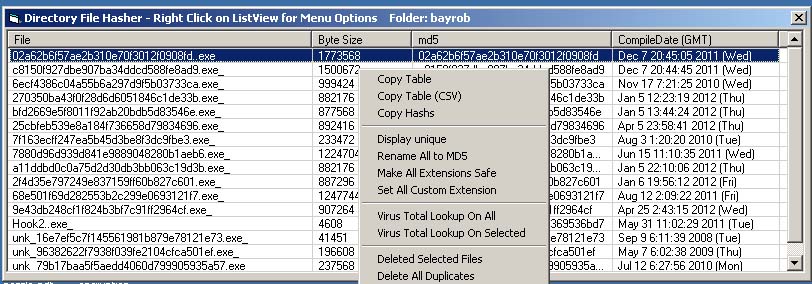
Hash Files (frmHash) is the per-folder analysis dialog opened by the Hash Files right-click menu on a folder. It hashes every file in the folder, lists them with size and PE compile date, and exposes a heavy right-click menu for triage — renaming, dedupe, reports, VT lookups, SQL export, and per-file diff.
The dispatch is shellext.exe "%1" /hash, which calls frmHash.HashDir. If the folder is empty, you're offered the option to recurse into subfolders — that handoff goes to frmRecursiveHashFiles.
Columns: File, ByteSize, MD5 (or SHA256 if Use SHA256 is on), CompileDate (GMT). Compile date column shows a content-type description for non-PE files. The path each row was loaded from is stashed in li.Tag, so renames and moves operate on the actual file even if the displayed name has been edited.
x64 redirection is disabled while hashing, so files in C:\Windows\System32 are hashed as their native 64-bit binaries on a 64-bit OS.
The window's system menu (right-click on the title bar, or click the title-bar icon) gets three extra entries appended at form load:
| Item | Action |
|---|---|
| Compare Hash Sets... | Opens the Compare HashSets dialog. The Hash Files window is detected at form load — if it's open, the Select In Main UI button in Compare HashSets is enabled. |
| Hash Search... | Opens frmMD5FileSearch with the current folder pre-filled as the base directory. |
| Generate Strings Dump for All | Equivalent to right-click → Reports → Strings Dump. |
| Item | Action |
|---|---|
| All | Tab-delimited table of name, size, hash, compile date. If every row is named with its own hash (as after Rename to MD5), the hash column is omitted to avoid duplication. |
| Selected | Same format, selected rows only. |
| CSV | "All" with tabs replaced by commas. |
| Sql Export | Opens the SQL Export dialog with this folder's listview as the source. |
| Hashs | One hash per line, all rows. Useful for piping into Compare HashSets. |
| Detailed | For every row, runs frmFileHash.ShowFileStats in automation mode and concatenates the per-file reports with a separator. Slow on large folders. Selected-only when more than one row is selected. |
| Item | Action |
|---|---|
| MD5 | Renames every file to its MD5 hash. Files already so named are skipped. Collisions get _2, _3, ... suffixes (no overwrite). A rename_log.txt mapping old → new names is written to the folder. |
| SHA256 | Same, with SHA256. |
| Sequential | Renames every file to 1, 2, 3, ... — useful for masking original names before sharing a sample folder. |
| Item | Action |
|---|---|
| Make All Extensions Safe | Appends _ to every file's extension (foo.exe → foo.exe_) so Explorer won't run them on a careless double-click. .txt files are skipped; already-safe and extensionless files are skipped. |
| Set All Custom Extension | Prompt for an extension; replace every file's existing extension with it. |
| Make folders for each | For every file, create a sibling folder with the same base name. Sets up the layout for the matching auto-analysis output. |
| Hash all files below | Opens frmRecursiveHashFiles against the current folder. |
| Move Selected to SubFolder | Folder picker, then move all selected files there. Skips files that already exist in the destination. |
| Deleted Selected Files | Confirms, then deletes the selected files from disk and the listview. |
| Delete All Duplicates | Confirms, then for every hash that appears more than once, keeps the first row and deletes the rest from disk. |
Each report is written to a temp file and opened in Notepad with a "save as" reminder header.
| Item | Output |
|---|---|
| Display unique | Hash ↔ comma-separated file-name lookup, one row per unique hash. Tells you which sets of files in the folder are duplicates of each other. |
| Unique ImpHash | Loads each PE, computes imphash, groups files by imphash. Output: each imphash, hit count, and the list of MD5s sharing it. Catches near-identical malware whose code differs but import table doesn't. |
| Strings Dump | Runs frmStrings.ParseFile + AutoSave on every file, producing one str_* file per source. Files already prefixed str_ are skipped. |
| Rich Header → Basic | One line per file: Exists, CheckSumOk, entry count. |
| Rich Header → Detailed | Full CRichHeader.dump per file — the complete decoded compiler/build-tool fingerprint block. |
| Item | Action |
|---|---|
| Lookup All | Builds a hash,path list of every row, puts it on the clipboard, and launches virustotal.exe /bulk. The VT helper reads from the clipboard. |
| Lookup Selected | Single selection: virustotal.exe "<path>". Multi: same clipboard handoff as Lookup All. |
| Submit Selected | Single: virustotal.exe "/submit <path>". Multi: clipboard, then virustotal.exe /submitbulk. |
| Set Api Key | Opens the API Key dialog. |
VT items are disabled when no API key is set.
| Item | Action |
|---|---|
| PE Diff | Select 1 or 2 rows. With 1 selected: launches pediff.exe on that file. With 2 selected: launches pediff.exe with both as arguments — structural diff of the two PEs. |
| Hash Diff against... | Folder picker. Opens a second hashing pass against the chosen folder, then writes a Notepad report comparing the two: count and unique-hash count for each set, files found in both, files unique to each side. |
| Google Selected | For each selected row, opens a Google search on the hash. |
| Item | Action |
|---|---|
| Set Font | Opens frmSelectFont for the listview's font/size. Persisted. |
| Use SHA256 | Toggle. Switches the third column between MD5 and SHA256 and re-hashes the folder. Persisted. |
| KB/MB Sizes (Ctrl-M) | Toggle. Switches the size column between raw bytes and human-readable (KB/MB). |
Top-level menu, not under Copy. Writes the same table that Copy → All produces to <parent>\<foldername>_hashs.txt, with a timestamp header.