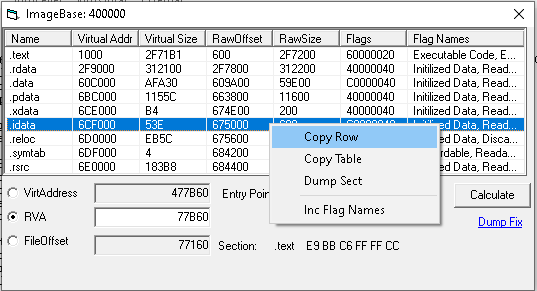
Offset Calculator (frmOffsets) translates between virtual address, RVA, and file offset for a loaded PE, displays the section table, peeks at the bytes at the calculated offset, and runs DumpFix on memory-dumped images. Reachable from File Hash → right-click → Offset Calculator (32/64bit).
The dialog is initialized with a CPEEditor instance that already has the file loaded. The window caption is set to the file's ImageBase. The Entry Point label is filled in, the RVA field is pre-populated with the EP, and the calculation runs once on load — so you arrive at the dialog already looking at the bytes at the EP.
The top listview shows every PE section. Columns:
| Column | Description |
|---|---|
| Name | Section name (.text, .data, etc). |
| Virtual Addr | VirtualAddress field, hex (this is an RVA, not a fully-resolved VA). |
| Virtual Size | VirtualSize field, hex. |
| RawOffset | PointerToRawData, hex. |
| RawSize | SizeOfRawData, hex. |
| Attributes | Characteristics flags, hex. |
Right-click on the section table:
| Item | Action |
|---|---|
| Copy Row | Copy just the selected row, tab-delimited, with the column headers shortened (VA / VSz / ROff / RSz / Attr) for clipboard-friendly width. |
| Copy Table | Same as Copy Row but for every row. |
Three radio buttons on the left choose which field is the source of truth:
| Mode | Inputs → Outputs |
|---|---|
| VirtAddress | Enter a fully-resolved VA (hex). The dialog computes RVA = VA - ImageBase, then converts the RVA to a file offset. Errors out if VA is below ImageBase. |
| RVA | Enter an RVA (hex). The dialog computes VA = RVA + ImageBase and the file offset. |
| FileOffset | Enter a file offset (hex). The dialog computes the matching RVA (and hence VA) by walking the section table. |
After each calculation:
The two non-source text fields are visually disabled (gray background) but text-selectable — on purpose, so you can copy the result. (The author's note in the source: "i hate that lordpe disables the textbox because you cant copy the text..")
The small underlined "Dump Fix" link in the bottom-right runs CDumpFix.QuickDumpFix against a copy of the loaded file (saved as <original>.fix). DumpFix is for memory-dumped PE images: it walks the section table and rewrites the raw-offset and raw-size fields to match how the image is laid out on disk after the dump (typically: align to disk, copy section data linearly).
After the fix, the dialog reloads <original>.fix as the new active file and shows a confirmation MsgBox. If the fix fails, the temp .fix file is deleted and a "Failed" message is shown.
The typical workflow: dump a section / process from memory, save it as a flat blob, open it in File Hash, invoke this dialog, click Dump Fix. The result should now be loadable by IDA / x64dbg / disassemblers in general.
0x prefix). GetHextxt validates with CLng("&h" & t).CPEEditor, which handles both.