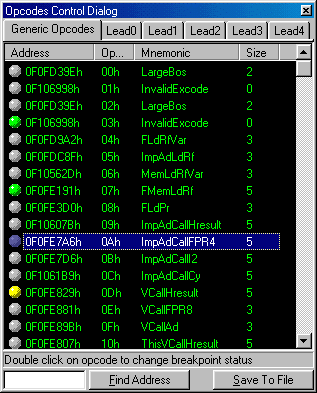
This dialog box shows a list of all the mnemonics of the virtual machine (the instructions), 6 tabs are available, one for each set of instructions.
The column Address, indicates us the address of the routine that controls the operation of the instruction, Op. it indicates us the opcode of the operation in hexadecimal, and Mnemonic indicates the name of the instruction. Size gives us the size of the instruction in bytes, if it is –1, the size is variable according to the arguments of the instruction.
Beside the address we have an icon in a circular way that can adopt different colors, according to the status of the breakpoint. Green for active, Yellow for disabled and gray for deactivated. To alternate among these states double click on the function name.
Save To File: Allows to save to a text file the complete listing of the selected instructions.
Find Address: Find an memory address among all the addresses of the selected set and it shows the opcode that belongs to it, if it exists.