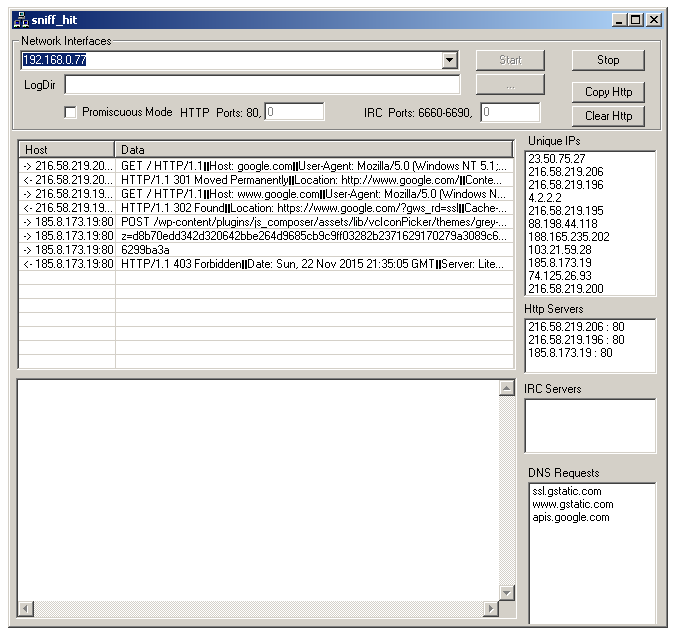
Sniff Hit is a specialized HTTP, DNS, and IRC sniffer that decodes target communication into a readable, copyable form. It captures protocol payloads on configurable ports rather than relying on default port numbers, so non-standard C2 setups still get decoded.
| Control | Purpose |
|---|---|
| Network Interfaces | Dropdown of interfaces with an IP. Select before starting the capture. |
| LogDir | Directory to write capture artefacts to. The browse button (...) opens a folder picker. |
| Promiscuous Mode | Enable promiscuous capture. Off by default since most analysis VMs are single-host. Turn on if you're capturing on a span port or a virtual switch with multiple guests. |
| HTTP Ports | Default 80. The second textbox lets you add a non-standard HTTP port (common for C2: 8080, 8000, 8443). |
| IRC Ports | Default range 6660-6690. The second textbox adds a non-standard port. |
| Start / Stop | Begin or end capture on the selected interface. |
| Copy Http | Copy the current HTTP capture to the clipboard. |
| Clear Http | Empty the HTTP pane without stopping the capture. |
Two main panes plus four aggregation sidebars on the right:
| Pane | Content |
|---|---|
| HTTP (top) | Per-request line with arrow direction (-> outbound, <- inbound), remote host:port, and the request or response data. Concatenated headers separated by |||. |
| IRC (bottom) | Decoded IRC traffic on the configured port range. Channel joins, NICK / USER negotiation, PRIVMSG content. |
| Unique IPs | Every distinct remote IP seen, deduplicated. |
| Http Servers | Distinct host:port combinations contacted on HTTP ports. |
| IRC Servers | Distinct host:port contacted on IRC ports. |
| DNS Requests | Distinct hostnames resolved. |
Tick Use SniffHit on the wizard. SysAnalyzer launches sniff_hit.exe in the background with /start and a logging directory pointed at the analysis folder, so a fresh capture begins as the wizard's countdown begins.
Standalone launch is available from Wizard → Tools → External → Sniffhit.
Sniff Hit is part of the Malcode Analyst Pack. Source is not bundled with SysAnalyzer; it is available in the MAP project on GitHub.