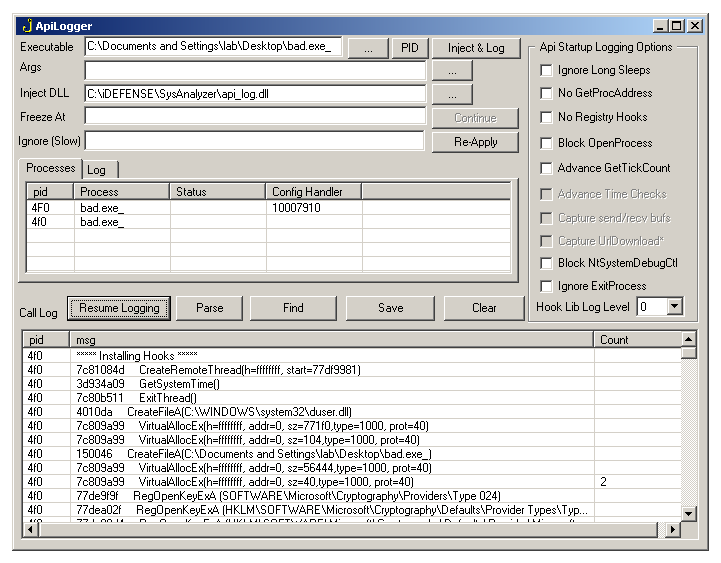
The API Logger is an in-process inline-hook engine that records selected Win32 API calls made by the target and any children it spawns. The hook DLL (api_log.dll or api_log.x64.dll) is injected into the target at launch and streams events back to the SysAnalyzer or standalone UI via window-message IPC.
Beyond plain logging, the logger doubles as a lightweight automated-analysis aid: it auto-dumps WriteProcessMemory writes to disk, optionally captures freed memory regions, can spoof time/debugger checks, and can pause execution at a pattern of your choice for manual inspection.
| Mode | How |
|---|---|
| Embedded | Tick Use Api Logger on the SysAnalyzer wizard. The Api Log tab streams entries during the analysis countdown. |
| Standalone | Launch api_logger.exe directly, or via Wizard → Tools → External → Api Logger. Required to attach to an already-running PID, log shellcode injections, or use the Freeze At / payload-capture features. |
The standalone UI auto-elevates on Vista+. The embedded mode and standalone mode share the same DLL, options panel, and IPC protocol — the only difference is which window receives the events.
The hook engine is MinHook. The API logger has cycled through three hook engines over its lifetime: the original OllyDbg-based hooker.lib, then the NTCore Hooking Engine (with diStorm as the disassembler), and now MinHook. The most recent move from NTCore to MinHook was made for x64 stability. Each migration is invisible to users of the logger but matters when reading the source — the wrapper in InstallHook() keeps the old call-site shape so existing hook installations weren't touched in the swap. Full attribution is on the License page.
Hooks are installed from DllMain at DLL_PROCESS_ATTACH. This is loader-lock territory, so installation order matters: engine-dependency hooks (VirtualAllocEx, VirtualFree, WriteProcessMemory) install first, then very-early-startup hooks (GetStartupInfoW, ExitProcess, ExitThread, used by the CRT during init), then the rest. The blocks are individually toggleable in the source for binary-search debugging if a target chokes on hook installation.
The injection mechanism depends on what's being launched:
| Scenario | Mechanism |
|---|---|
| New 32-bit process | StartProcessWithDLL — CreateProcess(CREATE_SUSPENDED), classic CreateRemoteThread of LoadLibraryA on the suspended process, then ResumeThread. |
| New 64-bit process | x64Helper.exe /startwdll — same flow but driven by the 64-bit helper. Helper also pre-loads dependency DLLs (wininet, urlmon, advapi32) into the suspended target before injecting api_log.x64.dll, so the hook DLL's own DllMain can resolve hook targets via plain GetModuleHandle without hitting loader-lock from a fallback LoadLibrary. |
| Already-running process (any bitness) | InjectDLL — bitness-matched CreateRemoteThread(LoadLibraryA) against the live PID. |
| Shellcode injection (32-bit only) | InjectShellcode — allocates RWE memory in the target and starts a thread at the buffer. Two sub-modes: Inject Shellcode creates the thread; Inject Data writes the buffer without spawning a thread. |
The DLL hooks CreateProcessInternalW (rather than the older CreateProcessA approach) to catch every code path that creates a process — including paths that the public CreateProcess* functions don't go through. For each child, the same injection routine runs against the child, propagating logging across multi-stage loaders and protected launches.
Children whose name appears in the analysis-tool blocklist (sysanalyzer.exe, sniff_hit.exe, windump.exe, etc.) are not injected. This avoids the logger recursing into its own driver UI when the target spawns one of them.
The standalone UI has the controls below. Settings are persisted under HKCU\Software\VB and VBA Program Settings\ApiLog\settings on form unload.
| Field | Purpose |
|---|---|
| Executable | Path to the binary to launch, or pid:NNNN to attach to a running process. Drag-and-drop is supported. Auto-detects 32 vs 64-bit and picks the matching DLL accordingly. |
| Args | Command-line arguments passed to the launched binary. Drag-and-drop is supported. |
| Inject DLL | Path to the hook DLL. Defaults to api_log.dll beside the EXE; switches to api_log.x64.dll automatically when the target is 64-bit. Drag-and-drop is supported. |
| PID | Open the process picker (frmListProcess) to fill the executable field with pid:NNNN. |
Browse buttons (...) | File pickers for executable, DLL, and arguments file. |
The label cycles between three modes when left-clicked:
Right-click the label to toggle DLL-name randomization. Caption goes red when active. With randomization on, the DLL is copied to %TEMP%\[random].dll before injection, defeating samples that fingerprint api_log.dll by name.
| Control | Purpose |
|---|---|
| Inject & Log | Start: launch the target (or attach to PID), inject the DLL, and begin recording. |
| Stop Logging / Resume Logging | Toggle: stop processing inbound messages without unhooking. The DLL keeps running in the target; new entries are dropped until resumed. |
| Ignore (Slow) | Comma-separated substrings. Any incoming log line containing one is dropped. Saved across runs. |
| Re-Apply | Re-apply the Ignore filter against the currently-displayed log, removing matching rows. Useful after editing the filter mid-session. |
| Find | Prompt for a substring; export every matching log line to a temp file in Notepad. |
| Clear | Wipe the call log. |
| Save | Save the call log to a chosen path. |
| Parse | Open the log in frmLogParser for higher-level extraction (URLs, paths, etc.). |
| Freeze At | Substring trigger. When an inbound log line contains this substring, the calling thread inside the target is held inside the IPC SendMessage (which blocks) until the user clicks Continue. Lets you suspend execution at a specific call site for memory inspection. Empty = disabled. |
| Continue | Release the thread held by the Freeze At trigger. Caption shows the held thread ID. |
Each entry has three columns: PID (hex), API call (formatted text), Count (number of consecutive duplicates collapsed into the same row).
The right pane has two tabs:
OPTION_SET = ... echoes, hook install failures, injection results, etc.).| Item | Action |
|---|---|
| Suspend | NtSuspendProcess on the target. |
| Resume | NtResumeProcess on the target. |
| Terminate | TerminateProcess on the target. |
| Update Config | Push the current option-panel state into the running DLL by CreateRemoteThread'ing the DLL's ConfigHandlerThreadProc. The DLL re-queries every option from the UI by sending ***config:NAME messages and reading the return value (see Config protocol below). |
| Update All | Push the current options to every PID in the list. |
| Kill All | Terminate every PID in the list. |
| Clear | Empty the PID list (display only; processes keep running). |
The Api Startup Logging Options frame configures DLL behavior. Most of these flags live as int globals in the DLL; ConfigHandlerThreadProc queries each one from the UI on startup and again whenever Update Config is invoked.
| Option | DLL behavior |
|---|---|
| Ignore Long Sleeps | Sets noSleep. Sleep() longer than 3 seconds is logged and skipped instead of executed. Defeats time-based stalls in samples that Sleep(60000) to outlast a sandbox window. Sub-3-second sleeps pass through unchanged to avoid breaking legitimate timing. |
| Advance GetTickCount | Sets queryGetTick. Each GetTickCount call queries the UI for an override value (***config:getTickValue). The UI returns successive values incremented by 0x10000 per call, defeating tick-delta anti-debug checks. |
| Block OpenProcess | Sets blockOpenProcess. OpenProcess() is logged but returns NULL. Note that the analysis-tool list (sysanalyzer.exe, ollydbg.exe, windump.exe, sniff_hit.exe, api_logger.exe) is always protected from OpenProcess regardless of this flag. |
| Block NtSystemDebugCtl | Sets blockDebugControl. NtSystemDebugControl calls return zero without invoking the real function. Defeats samples that probe debug-control to detect kernel debuggers and loop forever on success. |
| Ignore ExitProcess | Sets ignoreExitProcess. ExitProcess is logged but ignored. Useful when you want to keep poking after the sample tries to terminate. |
| No Registry Hooks | Sets noRegistry. Skips installing the advapi32 hooks entirely (RegCreateKeyA, RegOpenKey*, RegSetValue*, RegDeleteKey, etc.). Reduces noise when the registry surface isn't relevant. |
| No GetProcAddress | Sets noGetProc. Suppresses logging of GetProcAddress calls (which can fire thousands of times in startup). The hook itself remains installed because internal code uses Real_GetProcAddress. |
| Capture VirtualFree | UI-side option. On every VirtualFree log message, dump the freed region's contents to C:\virtualFree\[pid]_[addr]_[size].bin before the real VirtualFree runs. Catches packers that decrypt into a buffer, use it, then free it — the dump captures the unpacked stage. |
| Hook Lib Log Level | 0–3. Pushed to the DLL's logLevel global. Higher values get more verbose internal logging from the hook lib itself. |
The DLL and UI talk via WM_COPYDATA. Two message classes are layered on the same channel:
Format: [hex_pid],[hex_threadid],[message]. The UI parses the leading PID, optional thread ID, and treats the rest as a free-form log line. Older DLL builds omit the thread ID; the UI handles both shapes.
Format: ***config:NAME or ***config:NAME:VALUE. The DLL sends these from ConfigHandlerThreadProc at install time, and again every time the UI fires Update Config. The UI returns the current value via SetWindowLong(GWL_USERRETVAL) through the subclass library — SendMessage returns that value to the DLL, which assigns it to the matching global.
Config keys recognized by the UI:
| Key | Returns |
|---|---|
| noSleep | 1 if Ignore Long Sleeps is checked. |
| noRegistry | 1 if No Registry Hooks is checked. |
| noGetProc | 1 if No GetProcAddress is checked. |
| queryGetTick | 1 if Advance GetTickCount is checked. |
| blockOpenProcess | 1 if Block OpenProcess is checked. |
| blockDebugControl | 1 if Block NtSystemDebugCtl is checked. |
| ignoreExitProcess | 1 if Ignore ExitProcess is checked. |
| hooklibLogLevel | The chosen log level (0–3). |
| getTickValue | An incrementing tick value (GetTickCount() + n*0x10000) per call. Sent per hooked GetTickCount when queryGetTick is on. |
| handler:ADDR | One-shot from the DLL on install: the address of ConfigHandlerThreadProc. The UI stashes it on the per-PID row so Update Config knows where to CreateRemoteThread later. |
Resolved per DLL by the order shown below. Hooks marked capture have a side effect beyond logging.
| API | Notes |
|---|---|
| VirtualAllocEx | Logs allocation including returned base. |
| VirtualFree | Augmented with VirtualQuery region size since on Win8 x64 VirtualAlloc no longer flows through VirtualAllocEx. Capture: dumps freed region when option enabled. |
| WriteProcessMemory | Capture: automatically writes the buffer to wpm_[targetname]_mem_[addr].bin. This is one of the most useful hooks — it catches injected payloads before they run. |
| GetStartupInfoW | CRT hits this almost immediately; hooked early to be safe. |
| ExitProcess, ExitThread | Logged. ExitProcess can be suppressed via option. |
| Sleep | Logged when > 3s; can be skipped via option. |
| GetTickCount, GetSystemTime | Logged; GetTickCount can return spoofed values. |
| IsDebuggerPresent | Always returns 0. Standard anti-debug bypass. |
| CloseHandle | Frees internal handle bookkeeping. |
| CreateRemoteThread | If targeting a tracked PID that wasn't yet injected, injects api_log first, then runs the real call. |
| OpenProcess | Logs and (per option) blocks. Always blocks for analysis tools. |
| ReadProcessMemory | Logged. |
| CreateToolhelp32Snapshot | Logged. |
| Process32First/Next | Hide: rewrites szExeFile to "xxxx..." and PID to 0xDEADBEEF for analysis tools (sniff_hit, sysanalyzer, windump, olly, api_log, vmware, vmnat, vmount, vmnet, vmtool, procmon, filemon, regmon, procexp, rootkitrevealer, windbg, wireshark, win_dump, tcpdump). |
| Module32First/Next | Same hiding behavior on the module name. |
| DebugActiveProcess | Logged. |
| CreateFileA, _lcreat, _lopen | File creation logged with full path. |
| WinExec | Logged with command line. |
| DeleteFileA, DeleteFileW | Logged. |
| CreateMutexA | Logged with name — useful for sample family identification. |
| CopyFileA | Logged with source and destination. |
| CreateProcessInternalW | Resolved by hand against kernelbase/kernel32. Catches every CreateProcess code path. Capture: auto-injects api_log into the spawned child. |
| API | Notes |
|---|---|
| socket, bind, listen, accept | Server-side socket setup. |
| connect | Outbound connection — logs target host/port. Most useful single hook for C2 identification. |
| send, recv | Logged. |
| closesocket, shutdown | Logged. |
| gethostbyname, gethostbyaddr | DNS resolution — logs the requested name/address. |
| API | Notes |
|---|---|
| URLDownloadToFileA / W | Logs URL and destination. |
| URLDownloadToCacheFileA / W | Same for cache variant. |
| API | Notes |
|---|---|
| InternetGetConnectedState | Logged. |
| InternetConnectA / W | Logged with host and port. |
| HttpOpenRequestA / W | Logged with verb and path. |
The HTTP send-request hooks (HttpSendRequestA / W) are present in the source but currently disabled. When enabled they auto-write the POST body to disk.
| API | Notes |
|---|---|
| RegCreateKeyA, RegCreateKeyExA | Key creation. |
| RegOpenKeyA, RegOpenKeyExA | Key open. |
| RegSetValueA, RegSetValueExA | Value writes — persistence vector logging. |
| RegDeleteKeyA, RegDeleteValueA | Deletion. |
The wide variants (RegCreateKeyW, RegSetValueExW, etc.) are not currently hooked. The RegEnum* and RegQueryValue* hooks are present in the source but commented out as too noisy.
| API | Notes |
|---|---|
| NtSystemDebugControl | Logged; can be blocked via option. |
Independently of the user clicking Save, the DLL writes the following to disk during a run:
%TEMP%\wpm_[procname]_mem_[addr].bin — every WriteProcessMemory buffer.C:\virtualFree\[pid]_[addr]_[size].bin — freed memory regions when Capture VirtualFree is enabled.%TEMP%\[random].dll — when DLL-name randomization is on.When the embedded mode is in use, the SysAnalyzer countdown additionally writes api.log to the desktop analysis folder at the end of the run (and on form unload).
A variants of file, registry, and string-arg APIs are hooked; most W variants are not. Modern Windows malware that calls only Unicode APIs will silently bypass much of the file/registry logging. The Wininet, urlmon, file-delete, and CreateProcess APIs are the exceptions where W is hooked.DllMain install of dozens of hooks is fast but carries inherent loader-lock risk. The injector pre-loads dependency DLLs into the suspended target before injection to keep GetModuleHandle sufficient inside DllMain; if a target dynamically loads wininet or urlmon later in its lifecycle, the relevant hooks will not have installed.The DLL source (dll.cpp, main.h) and the API hook generator (which parses MSDN .h files to auto-build hook procedures) are under source/api_logger/ in the public source tree.